Dollar Tree
- 3.6
- Rating
- 1.00M
- Installs
- Free
- Price

 Analysis by App-foxy
I installed Dollar Tree to see whether it makes a familiar shopping trip genuinely easier or simply puts a store name on a phone screen. My overall impression is that it is most useful as a free companion for people who already shop at Dollar Tree, especially when they want to browse before leaving home. It does not replace the experience of checking a local aisle, but it can make the “what might I find today?” part of the trip more convenient.
The app comes from Dollar Tree Stores and sits in the shopping category. It is free to install, which makes trying it low-risk: you can explore it without paying for access to the app itself. That distinction matters, because free access is not the same as a guarantee that every item, promotion, or store-level detail will be available in the same way everywhere. I judge it mainly as a practical shopping aid rather than as a complete substitute for visiting a store.
How the app fits into an everyday Dollar Tree trip
I find a Dollar Tree trip works best when I decide what problem I’m trying to solve before I start browsing: a party setup, a small household restock, or just a few useful finds. The app can help me shape that plan from home, while leaving room to adapt once I see the actual shelves. That balance between preparation and discovery is also the key to judging where the app still falls short.
You May Also Like

 Blood Strike: 2.5 Anniversary
Blood Strike’s Loadouts Turn Every Drop Into a Tactical Gamble
A close look at Blood Strike’s custom loadouts: how fast access to signature weapons reshapes its battle royale rhythm, rewards preparation, and narrows the gap between fights.

 Pandora - Music & Podcasts
Pandora’s Music Is Easy to Start, but Harder to Recover
Pandora’s strength is its low-effort path from a seed to a station. Its weak spot is how much confidence it asks you to place in connection, setup, and quiet recovery.

 8 Ball Pool
 Is Built on Rivalries, Rematches, and Routine
A close look at the rivalries, rematches, shared routines, and unanswered safety questions that turn a quick pool match into a persistent mobile community.

 Samsung Music
’s Quiet Strength Is Playing What You Already Own
Its reach comes less from spectacle than from dependable access to a personal library. That simplicity is both the app’s strongest retention engine and its ceiling.

 AccuWeather: Weather Radar
AccuWeather Review: A Quick, Clear Forecast for Everyday Decisions
For everyday plans, the best forecast is the one you can understand quickly. AccuWeather makes rain timing, radar, and local conditions easy to act on, with a few trade-offs.

 Hill Climb Racing
Why Hill Climb Racing Still Turns Crashes Into One More Run
A tiny car, a bumpy hill and one more upgrade: Hill Climb Racing keeps resurfacing because its simple chaos makes every near-miss feel personal.
More From Our News Desk
View All News


A simple starting point for browsing
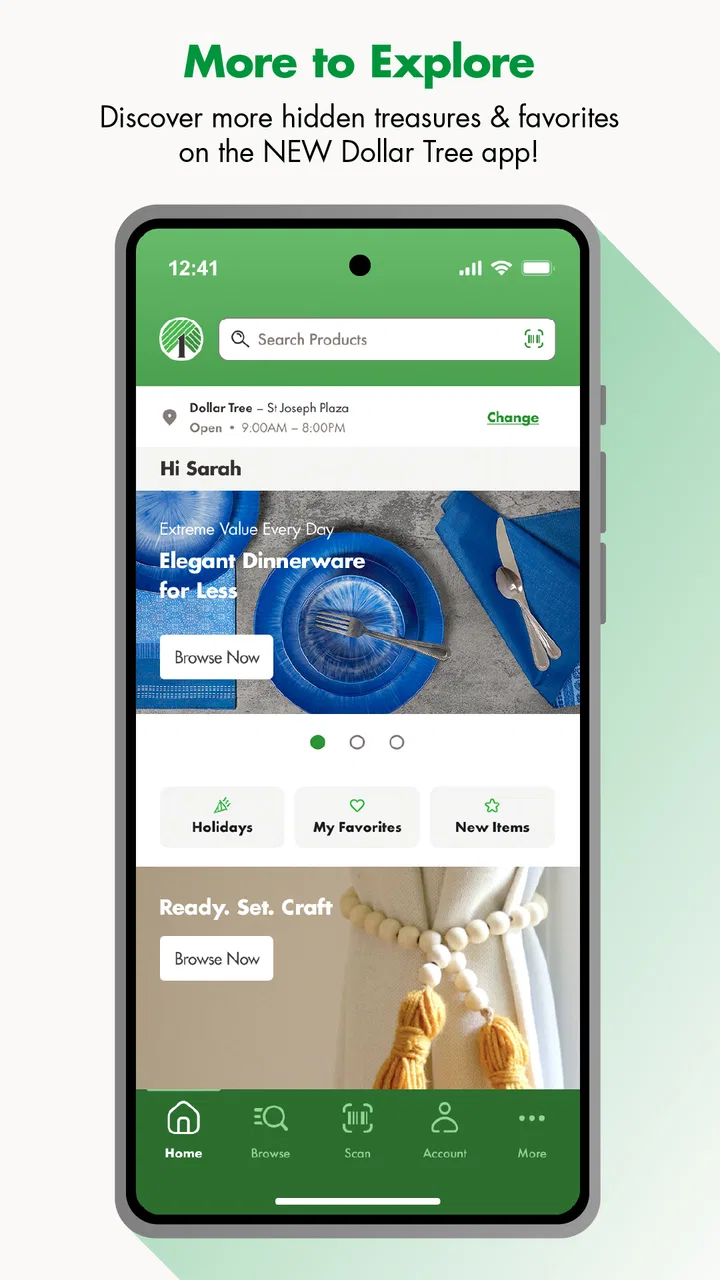
The central appeal is the chance to begin the hunt from a phone. Dollar Tree shopping often involves browsing rather than following a carefully fixed list, so an app can be helpful before a trip when I want to think through possible purchases. Instead of walking into a store with no plan at all, I can use the digital experience to decide whether the visit is worth making for a particular household need, seasonal idea, craft project, snack run, or small gift.
I would not approach it like a traditional supermarket app where a perfectly predictable weekly basket is always the main goal. Dollar Tree is more discovery-driven. Stock can feel different from one visit to another, and that makes the app’s role slightly different from a standard grocery ordering tool. It is better suited to inspiration, preparation, and checking what catches my attention than to promising that every item I see will be waiting in a specific nearby aisle.
That difference is important for expectations. If I need one exact product immediately, a direct call or an in-person check may still be more dependable. If I am looking for affordable possibilities and want to narrow down my ideas before going out, the app makes more sense. Its strongest value is reducing uncertainty about what I want to look for, not eliminating every uncertainty about store inventory.
What “free” means in practical terms
There is no purchase price for downloading the app. That makes it easy to test during a planned shopping trip, and it is also reasonable for occasional users who do not want another paid shopping service. The free entry point is especially attractive when I only need a quick look before visiting a store rather than a tool I use every day.
Still, the app’s free status should be evaluated separately from the cost of the products I might buy through or after using it. The app does not turn shopping into a cost-free activity; it simply removes an app-access charge. I would use it to organize my choices and then keep my normal spending limit in mind, because a low individual price can still become a larger basket when browsing encourages impulse purchases.
This is where the app can be both useful and slightly dangerous for a budget-conscious shopper. A list made before opening the app gives the experience a purpose. Without one, the discovery element may lead me to collect ideas instead of solving the original need. I found that the best approach is to separate “needed today” from “interesting if available.” That small habit keeps the free browsing experience from becoming an excuse for an unplanned haul.
A realistic use case: preparing for a quick household run
Imagine I am preparing for a small gathering and need disposable table items, simple decorations, and a few snacks. I can open the app at home, browse for possible combinations, and decide what kind of trip I am planning before I leave. The benefit is not only finding individual products; it is visualizing a complete, modest setup without visiting multiple stores first.
On the way to the store, I would keep the app open only as a reference rather than assuming it is a live promise of shelf availability. Once inside, I could use the ideas I saved mentally or noted down to make faster decisions. If one item is unavailable, the shopping-focused nature of Dollar Tree makes substitution easier than it would be for a specialized retailer. I can choose another color, package style, or comparable small item and still complete the broader plan.
This workflow is more useful than casually scrolling while already standing in a crowded aisle. Browsing at home gives me time to compare possibilities and set a limit. The store visit then becomes a confirmation and substitution exercise. That is a practical advantage many people may overlook: the app works best when it moves part of the decision-making away from the shop floor.
Useful habits that make the experience better
My first tip is to use the app in two passes. During the first pass, I look for ideas without committing to a purchase. During the second, I return with a short list divided into essentials and optional finds. This avoids confusing inspiration with availability and makes it easier to stop when the useful part of the trip is complete.
My second tip is to think in categories rather than one exact item. A Dollar Tree visit is often more successful when I search for a solution—party tableware, classroom supplies, cleaning helpers, or craft materials—instead of expecting one precise brand or package. This approach matches the store’s treasure-hunt character and gives me room to adapt if the local selection differs from what I hoped to find.
A third practical insight is to use the app before recurring occasions, not only emergencies. Preparing for a birthday, school activity, move, holiday decoration project, or small office event gives me time to compare themes and avoid buying the first acceptable option under pressure. The app is more valuable when it helps me plan a collection of small purchases than when I expect it to solve a last-minute shortage perfectly.
Where it is less convincing
The same discovery-based style that makes the app appealing can make it less satisfying for shoppers who want a highly controlled online order. If my priority is a guaranteed item, exact delivery timing, or a detailed grocery-style basket, I would usually prefer a retailer or service designed around dependable fulfillment. Dollar Tree’s app is not the first tool I would choose for a strict procurement task.
I also would not install it solely because I expect dramatic savings from the app itself. The access price is free, but the value comes from how well it helps me shop at Dollar Tree, not from an automatic discount created by downloading it. Someone who rarely visits the retailer may gain little from keeping it on a phone, particularly if a normal web search or an occasional store visit already covers their needs.
Another trade-off is attention. Shopping apps can make browsing feel productive even when I have no real reason to buy anything. With this one, that risk is amplified by the appeal of discovering small, inexpensive items. I recommend deciding on a budget and a purpose before browsing. That is not a criticism of the app alone; it is a sensible safeguard for any low-cost retail environment where several small choices can add up.
Who is likely to get the most value?
The best audience is a regular Dollar Tree shopper who enjoys browsing but still wants a little structure. Parents planning classroom or party supplies, renters gathering basic household items, crafters looking for inexpensive materials, and anyone preparing a small event can all benefit from starting their search digitally. The app is also a reasonable choice for people who like comparing possible themes or solutions before making a physical trip.
It can be useful for occasional shoppers too, provided they have a clear reason to open it. A person preparing for a seasonal project may not need a permanent daily shopping tool, but the free access makes a temporary trial easy. I would install it before a targeted visit, explore what fits the project, and remove it later if it does not become part of my routine.
On the other hand, I would suggest skipping it if I almost never shop at Dollar Tree, dislike browsing-oriented retail, or need highly reliable product confirmation. It is also not my preferred choice for someone who wants a full personal-finance system, a universal shopping list, or a single app covering many different retailers. Its usefulness is tied closely to this particular store and its hunt-for-finds style.
Technical and trust signals
The app is rated for Everyone, so its intended audience is broad rather than restricted to adults. It was released on February 23, 2024, and the current version is 1.4.25. It requires Android 7.0 or later, which means owners of older devices should check compatibility before planning around it.
Its reach is already substantial, with more than a million installs. The average rating is 3.5 from around 2,100 ratings, alongside roughly 900 written reviews. I read that combination as a reason to keep expectations balanced: plenty of shoppers have tried it, but the rating does not suggest a universally smooth experience. In my view, that supports treating it as a useful optional companion rather than an essential shopping platform.
The developer is Dollar Tree Stores, which gives the app a direct connection to the retailer it represents. That is reassuring for relevance, but it does not change the practical rule I would follow: use the app for preparation and discovery, then make final decisions based on the actual shopping situation. A retailer’s own app can be convenient without making every digital detail perfectly identical to what is on a local shelf.
How it compares with ordinary alternatives
The simplest alternative is visiting a store without using an app. That remains better when I am already nearby, have flexible expectations, and enjoy discovering products in person. The physical visit offers immediate context: I can see sizes, colors, packaging, and substitute options together. For spontaneous browsing, the store itself may be faster than planning on a phone.
A general search engine is better when I am comparing several retailers or looking for a specific product beyond Dollar Tree. It can widen the search, but it will not provide the same store-focused starting point. The app’s advantage is concentration: I am not sorting through unrelated retailers when my intention is specifically to explore Dollar Tree possibilities.
A notes app or paper list is better for strict budget control and simple errands. I can write exactly what I need, mark substitutions, and avoid visual distractions. Dollar Tree’s app becomes more valuable when I need ideas or want to shape a project; a basic list wins when I already know the answer and only need to remember it.
Finally, larger retail apps may be preferable for dependable ordering, delivery, or broad product comparison. I would choose those when convenience means certainty and fulfillment. I would choose Dollar Tree’s app when convenience means beginning a low-cost, store-specific search before I make the trip. The right choice depends less on which app is “best” and more on whether I am planning a discovery visit or executing a precise order.
My verdict on installing it
I recommend trying Dollar Tree if you already shop at the retailer and want a free way to prepare for visits, collect ideas, and approach the store with a clearer plan. The app delivers value through access and focus rather than through a paid membership or a promise that every online discovery will translate perfectly to one local shelf. That is a fair proposition for a shopping companion.
I would keep my expectations modest and my list specific. Use it before leaving home, separate essentials from optional finds, and allow substitutions once you are in the store. Those habits turn the app’s treasure-hunt character into a strength instead of letting it become endless browsing.
For me, the decision is a conditional yes: install it when Dollar Tree is already part of your shopping routine, skip it when you need guaranteed fulfillment or shop there only once in a while. It is not a universal shopping replacement, but it can make a familiar store visit more deliberate and more enjoyable. If that is the kind of value you want from a free retail app, Dollar Tree is worth testing.
FAQs for Dollar Tree
01What features does the Dollar Tree app offer?
The Dollar Tree app provides users with an array of convenient features including a store locator, digital coupons, and a personalized shopping list. Additionally, users can browse the weekly ads, view special promotions, and even scan barcodes for in-store price checks. This makes shopping both convenient and efficient.
02Is the Dollar Tree app free to download and use?
Yes, the Dollar Tree app is completely free to download and use on both Android and iOS devices. There are no hidden fees or subscription costs involved, allowing users to take full advantage of the app's features without any financial commitments.
03How does the Dollar Tree app enhance my shopping experience?
The Dollar Tree app enhances your shopping experience by offering personalized deals and digital coupons that can be redeemed in-store. The app also allows you to create and manage shopping lists, ensuring you never forget an item. Additionally, the store locator feature helps you find the nearest Dollar Tree location with ease.
04Can I use the Dollar Tree app for online shopping?
Currently, the Dollar Tree app is primarily designed for enhancing the in-store shopping experience. While it provides information about products and promotions, it does not support direct online purchases. However, it’s a great tool for planning your shopping trips and maximizing savings through digital coupons.
05Are there any privacy concerns with using the Dollar Tree app?
The Dollar Tree app requires certain permissions, like access to your location for the store locator feature, but it maintains a strong commitment to user privacy. The app’s privacy policy outlines how user data is collected, used, and protected, ensuring transparency and the safeguarding of personal information.
Pros
- Wide variety of affordable items.
- User-friendly interface for easy navigation.
- Regular updates with new products.
- Convenient store locator feature.
- Seamless checkout process.
Cons
- Limited availability of some items.
- Occasional app slowdowns reported.
- No online purchase option.
- Ads can be slightly intrusive.
- Inconsistent product descriptions.

Dollar Tree
Gallery